



可以讓非Unicode的軟件在Windows XP/2003上運行,即可以同時執行簡繁體日文等軟件
applocale使用方法:
先安裝,然后點開始菜單,在所有程序上找到Microsoft Applocale,再找到Applocale,點進去,然后下一步,選啟動應用程序,再點瀏覽,選擇你要進行轉換的亂碼游戲的EXE運行文件
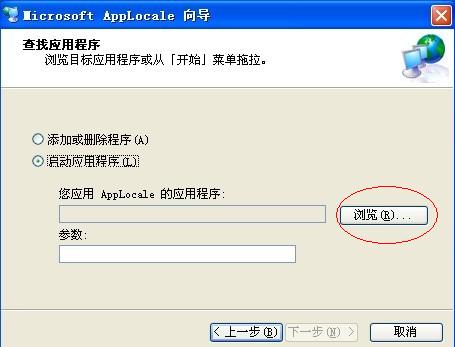
軟件截圖1
點“瀏覽”找到游戲執行文件
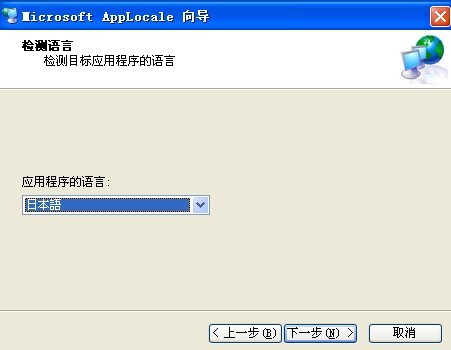
軟件截圖2
選日本語就可以了.
然后點下一步,在應用程序的語言上選中文(繁體),然后點下一步,最后你可以選擇創建快捷方式,那你下次進入是就不用慢慢再做一次了,最后按完成!那你進入游戲后就會發現亂碼問題都解決了!!哈哈!!很爽吧!!如果你下次要再進入,就直接從開始菜單那里進入就可以了!!
注意app并不是萬能的,一些游戲用這個依舊不能玩,如果報錯不能玩就換NTLEA或者LocaleSwitch這兩個軟件吧,總有一個能用的。
常用語言的補丁包:
全部是微軟官網鏈接,可以放心使用: 繁體中文: http://download.microsoft.com/download/officexpstandard/ie_zht/1/w98nt42kme/en-us/ie_zht.exe
日文: http://download.microsoft.com/download/OfficeXPStandard/ie_ja/1/W98NT42KMe/EN-US/ie_ja.exe
韓文: http://download.microsoft.com/download/officexpstandard/ie_ko/1/w98nt42kme/en-us/ie_ko.exe 安裝后需重新啟動
更新日志:
1.0 What is AppLocale
Unicode based platforms, such as Windows XP, emulate the language environment required to run non-Unicode applications by internally converting application's non-Unicode text data to Unicode using a system-wide variable commonly called the system local (or language for non-Unicode applications). The language of the non-Unicode applications should be of the same script or family as the one defined by the system locale. Failing to meet this condition results in display of garbage characters in the UI of the application.
This approach has few usability limitations:
- Only an administrator has the ability of setting the system locale value.
- Setting the system locale requires a system reboot.
- Only one system locale can be set at a time.
AppLocale (or Application Locale) is a temporary solution to these limitations caused by non-Unicode applications running on the Unicode (UTF-16) based Windows XP. AppLocale detects the language of the legacy application and simulates a corresponding system locale for code-page to/from Unicode conversions.
1、該版本Office軟件目前微軟已經停止維護,并不再提供正版維護;
2、為了能為用戶提供更好的正版軟件使用體驗,因此給大家提供下載版本為:Office 365/Office 2016版本;
3、使用盜版軟件有法律風險,因此推薦使用正版。










您的評論需要經過審核才能顯示
有用
有用
有用