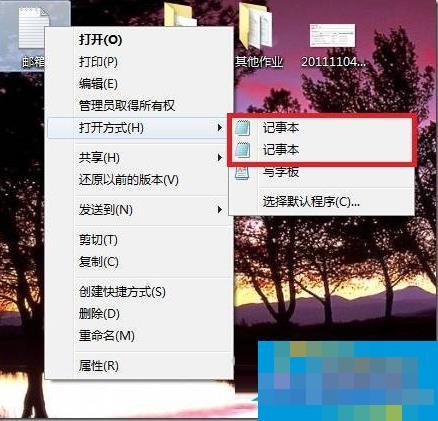
原因分析:
因為在我們系統windows文件夾(C:Windows)和system32文件夾(C:WindowsSystem32)下面各有一個notepad.exe程序,系統在注冊應用程序和文件關聯打開方式的時候,分別使用了它們,但是打開方式又要讀取這兩個地方,所以就出現兩個記事本了。
解決方法:
1、首先創建批處理,用來處理這個問題,把里面的代碼復制粘貼到文本文件,保存為后綴.bat的文件,執行就可以了。
@echo off
if exist “%systemroot%notepad.exe” set Npath=“%systemroot%notepad.exe %”1
if not exist “%systemroot%notepad.exe” set Npath=“%systemroot%system32notepad.exe %”1
reg add “HKCRtxtfileshellopencommand” /ve /d %Npath% /t REG_SZ /f
reg add “HKCRApplicationsnotepad.exeshellopencommand” /ve /d %Npath% /t REG_SZ /f
reg add “HKCRSystemFileAssociationstextshellopencommand” /ve /d %Npath% /t REG_SZ /f
2、然后就可以解決右鍵選擇打開方式中出現兩個記事本選項了。
命令簡單介紹:
if exist “%systemroot%notepad.exe” set Npath=“%systemroot%notepad.exe %”1